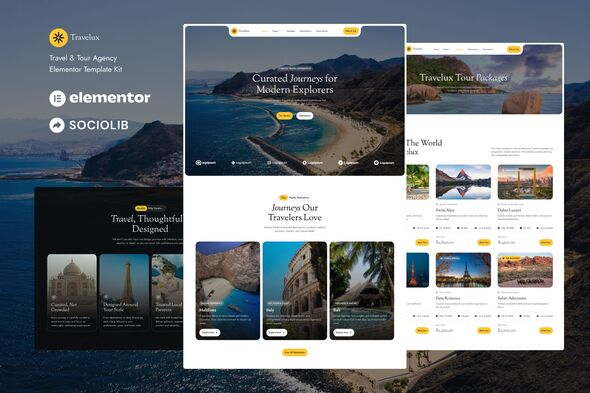
Travelux - Travel & Tour Agency Elementor Template Kit

Travelux is an Elementor Template Kit designed to quickly create a modern Tour & Travel Agency website using the Elementor Page Builder for WordPress. It targets travel-related businesses and destinations, offering a cohesive design language for a blog or agency site.
What Travelux is and how it works
- This is not a WordPress theme. Template Kits contain page content for Elementor page builder.
- Optimized for Hello Elementor. This kit has been optimized for use with the free Hello Elementor theme but may be used with most themes that support Elementor.
Key features and design philosophy
- 16+ Templates provide ready-to-use pages for rapid site assembly.
- True no-code customization with drag and drop visual builder for effortless design tweaks.
- Typography and color control customize fonts and colors in one place or fine-tune on individual elements.
- Clean and Minimal Design establishes a modern, professional look suitable for travel brands.
- Fast-loading performance-focused templates to improve user experience.
- Works with most Elementor themes ensuring broad compatibility.
- Responsive Design ensures good appearance across devices and screen sizes.
Templates included in Travelux
- Home
- Packages
- Destinations
- Experiences
- About
- Services
- Single Destination
- Contact
- Blog
- Post
- Header
- Footer
- Metform Contact
- Metform Booking
- Metform Single
- Metform Subscribe
- Global Style
Plugins installed with the kit
- ElementsKit Lite
- Metform
How to use Template Kits
This is not a WordPress Theme. Template kits contain the design data for Elementor only and are installed using the Envato Template Kit Import plugin for WordPress or directly through Elementor.
Detailed guidance and support
Detailed Guide:
How to Upload/Install Elementor Template Kits from ThemeForest to WordPress
For further assistance, go to Elementor > Get Help in the WordPress menu.
MetForm: how to import a custom form
Steps to import a MetForm template within a page containing a MetForm widget:
- Open the page in the Elementor editor where the MetForm should appear, then access the Elementor Navigator to locate the MetForm widget.
- Click “Edit Form” in the builder panel.
- Choose New and leave blank, then click the Edit Form button.
- Click “Add Template” (grey folder button).
- Click the “My Templates” tab.
- Choose your imported MetForm template, then click “Insert”.
- Once the template is loaded, click “Update”.
Header and footer setup with ElementsKit Lite
If you have Elementor Pro, you can set up headers and footers in Theme Builder. Pages created with Elementor should use the Elementor Full Width page layout for the global header and footer to appear.
- Go to ElementsKit > Header Footer
- Follow the wizard if prompted, click Next through the steps, then return to step 1 (entry of email address is optional).
- Click “Add New Template” and name your template, then toggle Activate/Deactivate to On.
- Click the gray Edit Content button; Elementor will open.
- Click the gray folder icon to access My Templates and insert the header or footer template.
- Customize and Publish.
Content management and customization workflow
- Access global styling options via the Global Style template included in the kit.
- Fine-tune fonts and colors centrally or at the element level for precise branding.
- Leverage the drag-and-drop builder to assemble pages quickly without coding.
Images and licensing considerations
This Template Kit uses demo images from Envato Elements and Unsplash. To use these images on your website, you will need to license them from Envato Elements, or substitute your own images.
Envato Elements workspace referenced for assets: Envato Elements Shared Workspace.
Target audience and use cases
- Travel Agencies seeking a compelling online presentation of services, packages, and destinations.
- Tour Operators needing dedicated pages for packages, destinations, reviews, and booking flows.
- Adventure and vacation planners looking to showcase experiences, destinations, and guides in a modern layout.
- Bloggers or agencies that want a stylish blog section integrated with travel-focused templates.
Technical requirements and compatibility
- Designed to work with Elementor Page Builder on WordPress.
- Optimized for the Hello Elementor theme but compatible with most Elementor-supported themes.
- Responsive design ensures usability across devices from desktop to mobile.
Summary of benefits for SEO and content strategy
- Pre-built pages streamline content architecture for travel-related topics, improving crawl efficiency for search engines.
- Structured templates enable consistent metadata, headings, and on-page elements that support topical relevance for travel services.
- Fast-loading and mobile-friendly design contribute to better user engagement metrics, which can positively influence rankings.
- Clear documentation and support pathways reduce site downtime and improve long-term maintainability for SEO teams.