Treasor - Author eBook Elementor Template Kit
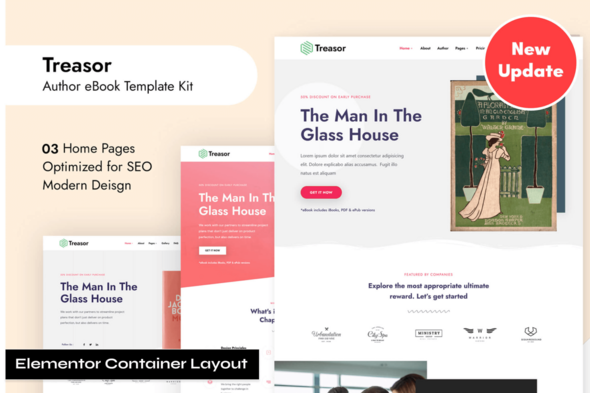
Treasor author ebook Marketing Template Kit is an Elementor Template Kit designed to quickly create professional author websites for promoting and selling eBooks. It includes pre-defined pages, header, footer, and blocks optimized for WordPress with Elementor.
What Treasor author ebook Marketing Template Kit Includes
Treasure is built to showcase and sell books or eBooks. It is suitable for ebook promotion, marketing, product landing, author pages, and book marketplaces. It is optimized for use with the free Hello Elementor theme but may be used with most themes that support Elementor.
Key features
- Header and Footer Builder
- Pre-defined important pages, header, footer, and other form blocks
- Designed to showcase and sell books or eBooks
- Suitable for ebook promotion, marketing, product landing, author pages, book marketplace
- Optimized for Hello Elementor theme; usable with most Elementor-supporting themes
- The Elementor Page Builder for WordPress provides visual drag-and-drop control over content and layout
- Custom addon for dynamic sliders and tabs with any template
- Front-end styling is easy to customize without coding knowledge
Required plugins
- Elementor Page Builder (Elementor Pro is not required)
- Elements Kit Lite
- MetForm
- Jeg Elementor kit
How to Install
- Install and Activate the “Template Kit Import” plugin from Plugins > Add New in WordPress
- Do not unzip
- Go to Elements > Installed Kits and click the Upload Template Kit button
- Before importing a template, ensure the Install Requirements button is clicked to activate required plugins
- For best results, do not import more than one template at a time
Detailed Guide
How to import Metforms and content blocks
- Import the metform block templates
- Import the page template where the form appears and right-click to enable the Navigator
- Locate and select the Metform widget and click Edit Form. Choose New, then Edit Form. The builder will appear
- Click ‘Add Template’ grey folder icon
- Click ‘My Templates’ tab
- Choose your imported metform template, then click ‘Insert’ (click No for page settings)
- Once the template is loaded, make any desired customizations and click ‘Update & Close’ The form will appear in the template
- Click Update
Assets
This Template Kit uses demo images from Envato Elements. You will need to license these images from Envato Elements to use them on your website, or you can substitute them with your own.
The information on this website is sourced from the
ThemeForest product page
.