Trimly - Barbershop & Hair Salon HTML Template

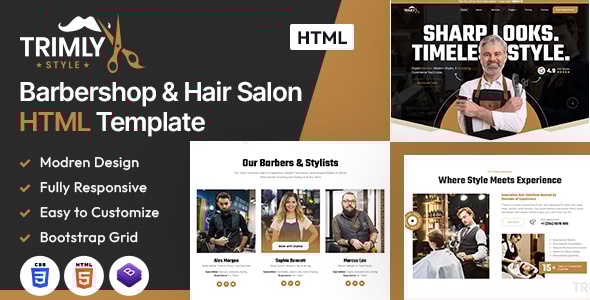
Trimly is a modern HTML template crafted for barbers, hair stylists, grooming studios, and beauty salons, combining stylish design with practical features to showcase services, teams, and bookings.
Key Features
- Stylish service sections that highlight offerings and pricing tables to help clients choose with clarity
- Barber profiles and appointment booking layouts for streamlined client scheduling
- Galleries, testimonials, and contact pages to build trust and convert visitors into customers
- Fully responsive, client-focused layout designed to adapt across devices and screen sizes
- Performance-optimized framework to ensure fast loading and smooth interactions
Template Library & Page Types
- 1 Home Page layouts and about page layout
- 27 valid HTML5 page templates designs
- Different Blog page styles and related templates
- 27 custom HTML templates like Home Page, About, Services, Projects and Contact
Trimly template features are coded with Bootstrap Bootstrap v5.3.8, HTML5 & CSS3 and unlimited color schemes. It’s compatible with all modern browsers and search engine friendly.
Design, Technology & Compatibility
- Built on a fully responsive and performance-optimized framework
- Compatible with all modern browsers and search engine friendly
- Bootstrap Bootstrap v5.3.8, HTML5 & CSS3 as core technologies
Color Schemes & Customization
How to edit color schemes:
- Open style.css from Trimly/assets/css folder with a text editor
- Build your own colors by replacing color codes
- Primary color example: #be8644; search and replace all to your new color code
On Load Animation
We use wow.js on load animation for the website. You can edit them by simply adding or changing the predefined classes name.
Assets, Fonts & Icons
Photos & Image Resources
- Enveto Elements
- Freepik Photos
- All images used for preview purposes only; not part of the final purchase files
Fonts & Icons
- Font-Awesome
- Font families: Inter Tight, Teko
Color & Typography Guide (Global Settings)
- Primary color: #be8644
- Secondary color: #ffffff
- Text color: #6a6a6a
- Accent color: #f8f3ec
- Font sizes: h1 190, h2 80, h3 50, h4 30, h5 24, h6 20, paragraph 16
Image links and assets are sourced from Envato Elements and Freepik, used for preview purposes only.
Editing Guide: HTML & CSS Files
- How to edit HTML files: 27 custom HTML templates like Home Page, About, Services, Projects and Contact
- Use a text editor (Dreamweaver, Notepad, Notepad++) to modify lines as needed
- How to edit CSS files: default style.css; open Trimly/assets/css/style.css and adjust styles
- To customize the banner color, edit the relevant CSS rules in .home-outer-wrapper for the banner image
Using Color Schemes & Styles
- Open style.css in Trimly/assets/css
- Define your color palette by replacing the primary color code
- Preview changes across components that reference the color variables
Notes on Resources & Support
- All images are used for preview purposes only; they are not part of the template files
- For questions about the template, support is available from the author; you may also visit ThemeForest item discussion forums for general questions