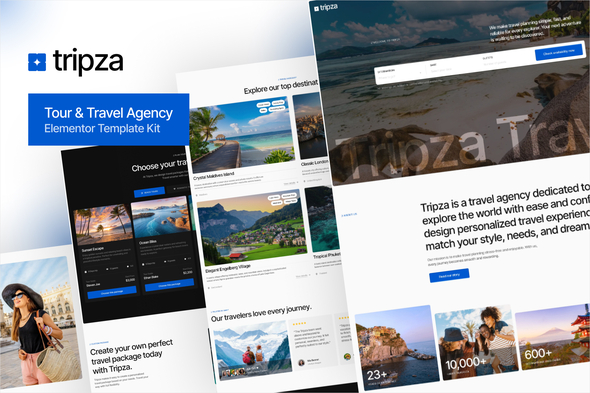
Tripza - Tour & Travel Agency Elementor Template Kit

Tripza is an Elementor Free-powered Template Kit for WordPress designed for tour operators, travel agencies, and vacation planners to showcase destinations, packages, and travel experiences with a modern, conversion-focused design. It provides an all-in-one solution to create a professional travel website without coding.
Product overview
- Designed for WordPress with Elementor Free, Tripza offers full flexibility to design and customize your site without coding knowledge.
- The intuitive drag-and-drop builder makes the site creation process simple and enjoyable, letting you focus on growing your travel business.
- Powered by WordPress and Elementor, Tripza provides a powerful, easy-to-manage platform with room to expand as your needs evolve.
- The template kit features a clean, elegant design with carefully selected layouts to highlight travel offerings, including destination showcases, package details, and blog content.
- With 22 templates and 15 fully responsive pages, Tripza ensures your website looks perfect on all devices.
- Designed to support travel itineraries, customer reviews, and booking information, the kit helps build trust and encourage action.
- Take your travel business to the next level with a site that inspires, engages, and converts visitors into loyal customers.
Key design and feature highlights
- Unique & Clean Design with a modern look aligned to a cohesive design system.
- Modern design based on design system for consistent typography, spacing, and components.
- 15 Ready to use pages for rapid site assembly and kickoff.
- Fully Responsive Layout ensures a great experience on mobile, tablet, and desktop.
- Unlimited colors and extensive typography options to match your brand.
- More than 900 ready fonts to support diverse visual styles.
- Fully Customizable with drag-and-drop editing and flexible components.
- Click to Go To Top for improved user navigation.
- Cross Browser Compatibility with Chrome, Firefox, Safari, and Opera.
Templates and pages included
- Global Theme Style
- Home
- Design Guideline
- About Us
- Destinations
- Destination Detail
- Services
- Reviews
- Packages
- Team
- FAQs
- 404 Error
- Coming Soon
- Our Blog
- Single Post
- Contact Us
- Header
- Footer
- Subscription Form
- Check Availability Form
- Coming Soon Form
- Contact Form
- Feedback Form
Templates Include: Global Theme Style, Home, Design Guideline, About Us, Destinations, Destination Detail, Services, Reviews, Packages, Team, FAQs, 404 Error, Coming Soon, Our Blog, Single Post, Contact Us, Header, Footer, Subscription Form, Check Availability Form, Coming Soon Form, Contact Form, Feedback Form. Required plugins (included) are Elementskit Lite, Gum Elementor Addon, MetForm, and Qi Addons for Elementor.
How to use Template Kits
This is not a WordPress Theme. Template kits contain the design data for Elementor only and are installed using the Envato Template Kit Import plugin for WordPress or directly through Elementor.
Detailed installation guidance: How-to Upload & Install Elementor Template Kits from ThemeForest to WordPress.
For further support, go to Elementor > Get Help in the WordPress menu. More guidance can be found in Envato’s help resources and related documentation.
Importing MetForm custom forms
- Edit the page where a form should appear and open the Elementor navigator to locate the MetForm widget.
- Click Edit Form in the builder panel.
- Choose New, leave blank selected, then click Edit Form button.
- Click “Add Template” (grey folder button).
- Click the “My Templates” tab.
- Choose your imported MetForm template, then click Insert.
- Once the template is loaded, click Update.
Header and footer setup with ElementsKit Lite
- If you have Elementor Pro, set up headers and footers in Theme Builder.
- Pages created with Elementor should have Page Layout set to Elementor Full width for the global header and footer to appear.
- Navigate to ElementsKit > Header Footer.
- If prompted to go through the wizard, click Next to advance and return to step 1 (entry of email is optional).
- Click Add New Template and name your template, then toggle Activate/Deactivate to On.
- Click Edit Content. Elementor will open.
- Click the grey folder icon to access My Templates and Insert the header or footer template.
Customization and best practices
- Utilize the Global Theme Style to maintain consistency across pages.
- Leverage the design system foundation for predictable typography, color, and spacing.
- Test across devices to ensure the 15 pages and 22 templates render correctly on mobile, tablet, and desktop.
- Prepare alternate imagery and content to replace Envato Elements demo assets with licensed or own visuals.
Licensing and assets
Note: This Template Kit uses demo images from Envato Elements. You will need to license these images from Envato Elements to use them on your website, or substitute them with your own assets.
Envato Elements workspace: Envato Elements workspace.
Included plugins and dependencies
- Elementskit Lite
- Gum Elementor Addon
- MetForm
- Qi Addons for Elementor
These are listed as required plugins included with the kit to ensure full functionality of forms, headers, footers, and widgets.
Supported platforms and accessibility notes
- Cross browser compatibility: Chrome, Firefox, Safari, Opera
- Fully responsive layouts ensure accessibility across devices
Target audience and suitability
- Suitable For: Tour & Travel Agencies
- Suitable For: Tour Operators & Guides
- Suitable For: Vacation & Holiday Planners
Support, resources, and next steps
- For further support, use Elementor > Get Help in WordPress.
- Refer to the Detailed Guide and installation videos linked in the template kit documentation.
- Consider licensing Envato Elements images or substituting your own assets for a final production site.