Umaya - Creative Portfolio Agency WordPress Theme
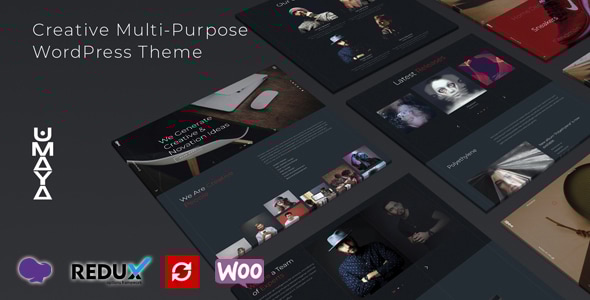
Umaya WordPress Theme is a uniquely designed WordPress theme with a modern look, ideal for digital marketing sites to showcase your brand, services and works, featuring a beautiful and unique design for a strong online presence.
Theme features
- Built on WPBakery Page Builder — which is the most awesome visual page builder for WordPress.
- Drag & Drop Page Builder — WPBakery Page Builder for WordPress is drag & drop frontend and backend page builder plugin that will save you tons of time working on the site content.
- Fully Responsive Design & Retina Ready — Umaya is fully responsive which means it will look excellent on your desktop, laptop, tablet and smartphone.
- Soft Page Transition — smooth transitions between sections for a polished user experience.
- Unlimited Colors — includes backend color selectors so you can easily and quickly change your color throughout the entire theme (Global Red Color).
- One Click Demo Data Setup — quick import to get your site running fast.
- WooCommerce — built-in compatibility for online store functionality.
- Overlay Menu / Hamburger Menu and Classic Menu — flexible navigation styles.
- Standard Blog Pages — ready-to-use blog layouts.
- Powerful Admin Panel — an extremely advanced admin to customize quickly and easily the theme.
- Touch & swipe support — optimized for touch devices and gestures.
- Shortcode Generator — easy-to-use shortcodes for implementing features.
- REDUX Option Framework — extensible options framework for WordPress themes and plugins.
- Custom Widgets — built-in widgets designed for Umaya.
- Contact Form 7 Plugin — styling included for the Contact Form 7 plugin.
- Clean Code — well-structured code designed for easy extension by developers; utilizes the latest WordPress features.
- SEO Optimized — inbuilt SEO parameters to promote your site.
- Cross Browser Compatible — tested in IE 9–11; Firefox; Safari; Chrome and Opera.
- Free Theme Install — demo data and setup assistance included.
- Demo Dummy Content XML Data Included — ready-made content to accelerate setup.
- Ongoing Updates — free updates after the initial purchase.
- Extensive Documentation — detailed docs to help with customization, even for non-coders.
- Dedicated Support — experienced support team available for questions and help.
- More Features Coming Soon… — indicates ongoing development.
Customization, compatibility and ecosystem
- Theme responsiveness and accessibility — designed to look great across devices with retina-ready visuals.
- Ecosystem integration — integrates with WPBakery, WooCommerce, Contact Form 7 and Redux Framework.
- Shortcodes and widgets — provides reusable content blocks and widgets to speed up page creation.
- Global color control — color options affect the entire theme for cohesive branding.
- Theme documentation — comprehensive guidance to help users customize and extend the theme.
Pages, menus and content features
- Overlay Menu / Hamburger Menu and Classic Menu — multiple navigation schemes to fit site style.
- Standard Blog Pages — ready-made blog layouts with standard post formats.
- Portfolio options — options to tailor portfolio details and category page slugs (referenced in updates).
Performance, accessibility and reliability
- Cross Browser Compatible — tested across major browsers for consistent rendering.
- SEO Optimized — inbuilt SEO features to improve search visibility.
- Clean Code and Regular Updates — maintainable, extensible code with ongoing enhancements.
Documentation, support and onboarding
- Extensive Documentation — detailed guides to assist users of all skill levels.
- Dedicated Support — responsive help from the support team.
- One Click Demo Data Setup — simplifies initial configuration and onboarding.
Compatibility notes and upgrade guidance
Important: If you are using WordPress version 5.9.1, Login via cPanel/ FTP. Go to the wp-content > themes and delete the umaya folder. After that, reinstall the latest version of the theme.
Updates and Version History
2025
- Updated 25 April 2025 — Version 4.1.3 — Update: Compatible with the latest version of WordPress.
2024
- Updated 06 Dec 2024 — Version 4.1.2 — Update: Compatible with the latest version of WPBakery Page Builder.
- Updated 25 Aug 2024 — Version 4.1.1 — Updated: Compatible with latest version of WooCommerce.
2023
- Updated 20 Aug 2023 — Version 4.1 — Update: Font Awesome version has been updated. Updated: Compatible with latest version of WooCommerce.
- Updated 28 Jun 2023 — Version 4.0 — New: Options added for changing the Portfolio details page's base/slug name. Please Check Blog & Portfolio Options. New: Options added for changing the Portfolio Category page's base/slug name. Please Check Blog & Portfolio Options. Updated: Compatible with latest version of WooCommerce.
- Updated 28 Mar 2023 — Version 3.9 — Fixed: Contact Form 7 submit animation issue has been fixed. Updated: Compatible with latest version of WooCommerce.
2022
- Updated 14 Dec 2022 — Version 3.8 — Fixed: Hamburger & Mobile Menu background color changing option issue has been fixed. Updated: Compatible with latest version of WPBakery. Updated: Compatible with latest version of WooCommerce.
- Updated 23 Oct 2022 — Version 3.7 — Fixed: Typography options loading issue has been fixed.
- Updated 26 Jun 2022 — Version 3.6 — Updated: Compatible with latest version of Redux Framework.
- Updated 23 May 2022 — Version 3.5 — Fixed: Carousel pagination issue has been fixed. New: Selected Category filter option added for Portfolio and Blog Masonry Elements.
- Updated 12 May 2022 — Version 3.4 — Fixed: Classic menu typography option issue fixed.
- Updated 26 Mar 2022 — Version 3.3 — New: Compatible With WooCommerce. New: Title tag selector option added for the Header style and all WPBakery title elements. New: Custom URL option added for WPBakery Team Elements.
- Updated 03 Mar 2022 — Version 3.2 — New: Custom Social option added. Please check Social options from the Umaya Options. New: Categories information Enable/Disable option added for the Portfolio Elements. New: Centered slide and pagination Enable/Disable option added for the Portfolio Carousel, Team Carousel and Blog Carousel elements.
- Updated 23 Feb 2022 — Version 3.1 — Updated: Compatible with the latest version of WordPress.
- Updated 04 Feb 2022 — Version 3.0 — New: Classic Menu option added. New: Portfolio details page's pagination Enable/Disable option added. Updated: WPML string translation option updated. Updated: Compatible with latest version of WordPress.
- Updated 14 Jan 2022 — Version 2.9 — Fixed: Theme Installation Error Issue.
2021
- Updated 28 Jun 2021 — Version 2.8 — Compatible with latest version of WordPress.
- Updated 26 Jun 2021 — Version 2.7 — Compatible with latest version of WordPress.
- Updated 14 Jun 2021 — Version 2.6 — Portfolio category page loading issue has been fixed. The .pot file has been updated.
- Updated 11 Jun 2021 — Version 2.5 — Initial Released. Option added for Enable/Disable custom content of the header style "Revolution Slider".
- Updated 10 Jun 2021 — Version 2.4 — Initial Released. Theme broken issue has been fixed. Option added for add the main row class. Some CSS issue has been fixed.
- Updated 12 May 2021 — Version 2.3 — Initial Released. Option added for add the main row class. Some CSS issue has been fixed.
- Updated 16 May 2021 — Version 2.2 — Initial Released. Portfolio layout issue has been fixed. Testimonial carousel issue has been fixed.
- Updated 12 May 2021 — Version 2.1 — Initial Released. Some bugs fixed for previous update.
- Updated 06 May 2021 — Version 2.0 — Initial Released. New: Option added for Enable/Disable sticky menu. New: Option add for select navigation layout to Dark/ Light. New: Option add for reduce space for Portfolio Column Carousel Element. New: New Title element added "Umaya Simple Title".
- Updated 26 Apr 2021 — Version 1.9 — Initial Released. Fixed: Navigation's URL issue has been fixed. Fixed: Portfolio item loading issue has been fixed.
- Updated 10 Mar 2021 — Version 1.8 — Initial Released. Compatible with the latest version of WordPress. Fixed: Slider autoplay speed issue has been fixed.
- Updated 28 Feb 2021 — Version 1.7 — Initial Released. New: Option added for hiding the Portfolio & Post details page footer. Fixed: Particles effect's color issue has been fixed.
- Updated 19 Feb 2021 — Version 1.6 — Initial Released. Fixed: Logo Width & Height option updated.
- Updated 17 Feb 2021 — Version 1.5 — Initial Released. Some color issue has been fixed.
- Updated 11 Feb 2021 — Version 1.4 — Initial Released. WPBakery's all slider and carousel element's slider autoplay options are fixed. Typography option has been updated. Umaya Plugin New Version 1.3 — Please update Umaya Plugin via plugin section. If you are unable to update Umaya Plugin, then uninstall/delete old Umaya Plugin from your site and re-install again by required plugin notification Or Appearance => Install Plugins.
- Updated 11 Feb 2021 — Version 1.3 — Initial Released. Header Midnight feature has been fixed. Documentation file has been updated. Umaya Plugin New Version 1.2 — Please update Umaya Plugin via plugin section. If you are unable to update Umaya Plugin, then uninstall/delete old Umaya Plugin from your site and re-install again by required plugin notification Or Appearance => Install Plugins.
- Updated 10 Feb 2021 — Version 1.2 — Initial Released. One Click Demo Data Import issue has been fixed. Fullscreen header image upload issue has been fixed. Umaya Plugin New Version 1.1 — Please update Umaya Plugin via plugin section. If you are unable to update Umaya Plugin, then uninstall/delete old Umaya Plugin from your site and re-install again by required plugin notification Or Appearance => Install Plugins.
- Updated 07 Feb 2021 — Version 1.1 — Initial Released. Demo data import issue has been fixed.
The information on this website is sourced from the
ThemeForest product page
.