Uppercase - WordPress Blog Theme with Dark Mode

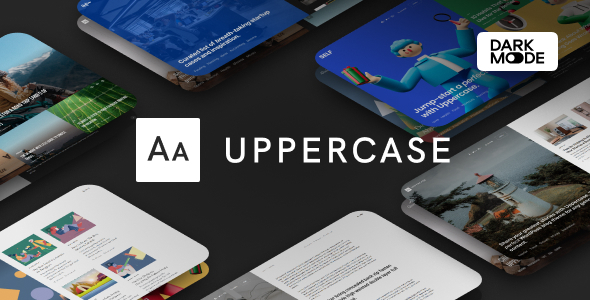
Uppercase is a modern WordPress blog theme built for content-based blogs and magazines, featuring dark mode, 9 demos, flexible headers, and a rich set of performance, SEO, and customization options.
9 Beautifully Designed Demos in One Theme
Thanks to our signature feature, the Demo Switcher, you may apply a new demo any time without affecting your content. If you feel bored with one of the demos, simply apply a new one and get a completely different appearance of your blog or magazine.
- 9 demos in one theme
- Demo Switcher for instant visual changes without content edits
- Different looks for blogs or magazines without duplicating content
Dark Mode
Turn on Dark Mode for a great viewing experience especially in low-light environments. Dark Mode is a dramatic new look that’s easy on your eyes and helps you focus on the content. It uses a dark color scheme and is activated automatically based on the browser’s preferred settings or manually with a toggle. Turn on Dark Mode to give your eyes a break.
Multiple Page Header Types
There are three different page header types for your posts and pages. Display your featured posts’ header with an image overlay or a smaller page header.
Smart Colors
When you select a dark background color for your header or footer, the text and links color will automatically change to white. You don’t need to set up a lot of color option, as most of them will work automatically based on your selection.
Customize with Instant Live Preview
All theme options can be configured with the native WordPress customize feature. Forget the outdated settings pages and manually refreshing your page to see the changes. Preview all the changes live while configuring your perfect blog or media.
Multiple Archive Layouts for Homepage and Archive Pages
Choose from different post archive layouts for your homepage and archive pages. Display your posts in grid, list, or full layouts.
Multiple Page Layouts
Select the matching page layout for your homepage, archives, posts, and pages. Display a sidebar on either the left or right side or use the full-width page layout for your content.
Super-Fast Mega-Menu
Showcase your recent posts with a thumbnail right in the menu dropdown. The menu remains fast because content is requested dynamically, only when a user hovers over the parent menu item.
AMP Support
We have added styles for the AMP pages to match the main styles of your website. Simply activate the official WordPress AMP plugin to enable Google Accelerated Mobile Pages on your website.
Exclude Duplicate Posts
Exclude featured posts from the main archive with a single click to avoid duplicate content on the homepage, aligning with best practices for search engines.
Google Fonts
Create different styles with 800+ Google Fonts supported. Simply select the desired font from the dropdown and preview it instantly on your website – no more confusing CSS rules or code snippets.
Additional Content
Insert content into template parts without editing template files or using a child theme. Examples include a header-ad spot, a short homepage description before featured posts, or a subscribe form below post content.
Smart Sticky Navigation
Control the main navigation behavior: show only on scroll up, keep it sticky, or disable the feature entirely. Change options in theme settings with a single click.
Sticky Sidebar
Make widgets sticky during scrolling with two alignment options: bottom edge of the sidebar or top edge of the last widget. Optimized for desktops and mobiles with smooth, flicker-free behavior using native sticky positioning.
Smart Multi-Level Menu
Support for unlimited menu levels. If space runs out, dropdowns appear on the opposite side and the feature works on mobile touch devices as well.
Mobile Slide-Out Menu with Widgets
Display the mobile menu on hamburger icon tap and include widgets like social links, subscription forms, or a Facebook fan page, just like a regular sidebar.
Paginated Posts
Divide your posts into multiple pages and add properly styled pagination at the bottom of your posts.
Guest Authors and Multi-Author Posts with Co-Authors Plus Support
Involve guest authors without separate user accounts or add multiple authors per post with the integrated Co-Authors Plus plugin support. All post authors, including contributors and guest authors, can have social accounts and a bio too.
RTL
Built-in support for RTL (right-to-left) languages like Arabic, Hebrew, Persian or any other RTL written language.
Numbered Pagination, Load More, and Infinite Load
The Load More button and Infinite Load encourage longer engagement by browsing post archives without page refresh. REST API is used for instantly fetching posts for fast loading.
Post Views with Google Analytics Synchronization
Display the number of post views among other post meta with integrated post views support.
Post Reading Time
Easily add post reading time; the reading time is calculated automatically based on average adult reading speed.
Retina-Ready
Vector-based elements and Retina-ready images ensure crisp visuals on high-density screens.
Adaptive Optimized Image Sizes
A small number of generated thumbnails saves disk storage and speeds up thumbnail generation. Images are served in original or near-original size when appropriate, aligning with Google’s preferences for optimized image delivery.
Ultra Responsive
The theme is tested across devices and emulators to ensure high-quality rendering on desktops, tablets, and mobiles.
Feature-Rich, yet Simple
Many built-in features with live-preview options. Everything integrates naturally into the WordPress UI, with no coding required to set up.
SEO by Yoast Support including Breadcrumbs Styles
Activate breadcrumbs with Yoast SEO to place them correctly and style them automatically for better search visibility.
Live Search Results
Get instant search results as you type, with keyboard navigation support.
Built-in Styles for WordPress Galleries
The default WordPress galleries (or the [gallery] shortcode) look good out of the box thanks to integrated gallery styles.
Related Posts
Increase pages-per-visit by displaying related posts under single posts, with automatic triggering when enough posts exist in the same category.
Optimized CSS without Dependencies
No Bootstrap or other dependencies. Faster loading times are achieved, benefiting both users and Google.
Coded with WordPress Coding Standards
WordPress Coding Standards are followed to maintain clean, readable, and update-safe code.
Super-Fast
Performance-focused enhancements and checks (e.g., Query Monitor) to minimize unnecessary database requests.
Google Structured Data Support
Structured data is added with special classes to help Google understand content and improve rankings.
Built with Hooks & Developer Friendly
Numerous actions and filters enable easy customization via child themes and safe updates.
Translation-Ready
A .pot file is included to translate the theme using POEdit or Loco Translate.
WPML and Polylang Compatible
Supports both WPML and Polylang for multilingual websites.
Numerous Ads and Banner Spots with built-in AdSense Support
Easily monetize with ad spots in multiple template locations; place ad snippets through the WordPress Customize section without editing templates.
One-Click Demo Import and Demo Switcher
Apply a different demo anytime, even with existing content, and optionally import demo posts to start a brand-new blog quickly.
Made by Elite Author with a Featured Item
Since 2017, featuring on ThemeForest, with thousands of sales and ongoing support and updates.
Powered by Powerkit
Powerkit is an in-house plugin that extends theme features such as share buttons, social links, author widgets, newsletter forms, sliders, tiled galleries, lightbox, lazy loading, and more. Modules are modular and can be disabled without slowing the site.
Share Buttons
Enable share buttons on single post pages in three locations: before post content, after post content, and in the floating post sidebar. Choose social networks and adjust counts per network. Supports dynamic counts via REST API and caching-friendly performance.
Social Links
Built-in social links with counters; place in header, footer, or widgets with layouts including inline, horizontal, or column formats. Counters show follower counts and are fetched dynamically for performance.
Facebook Integration
Embed a Facebook fan page in the sidebar or post content, and optionally replace WordPress comments with Facebook comments or append them to default comments.
Pinterest Integration
Pin images from posts with Pin It buttons; captions supported and special classes help fetch shared images for Pinterest.
Twitter Integration
Embed your Twitter feed in a widget or post content via a shortcode.
Instagram Integration
Display Instagram feeds in the sidebar, post content via shortcode, or site footer, with likes and comments visible for engagement.
Opt-in Forms
Integrate subscription forms with MailChimp, including one-click AJAX subscriptions and GDPR-compatible captions.
Retina Images
Enable Retina Images to ensure crisp visuals on high-density displays.
Lazy Load with Low-Quality Image Placeholders
Speed up pages with lazy loading and optional LQIP placeholders for a blur effect while images load.
Lightbox
Enlarge images in post content or galleries with a responsive lightbox, supporting all gallery types.
Adobe Fonts (Formerly Typekit) and Custom Fonts
Adobe Fonts support with live preview in the WordPress customize section; also supports uploading custom fonts for use in the theme.
Contributors Widget and Author Widget
Display a list of contributors in the sidebar and show author information, avatar, bio, and social links.
Justified Galleries
Create beautiful justified galleries to tell a story with a natural layout.
Slider Galleries
Insert responsive, Retina-ready slider galleries with mobile touch/swipe support and optional pagination or navigation arrows.
Featured Posts Widget
Display your featured posts in the sidebar with layouts including standard, large, or numbered; filter by category, tag, or post IDs and sort by views or date.
Table of Contents
Easily add a table of contents to longer posts to help readers navigate to sections of interest.
Numbered Headings
Create list-style articles with built-in numbered headings to boost readability and potential virality.
Disclaimer
Adobe Fonts (formerly Typekit) note: if Adobe Fonts fonts aren’t available, they may be substituted with default fonts or Google Fonts; see documentation for details.
Site Specific Options
Some site-specific settings may require manual configuration (e.g., social links, widgets) to align with demo content.
Image Credits
Sample images in live previews are for demonstration only and not included with the purchase; assets are purchased or licensed.
Landing Page
The starting preview is a landing page to promote the product and showcase demos; it is not included in the theme.
Page Speed
Page speed scores vary by demo, server configuration, and content; some features may impact performance differently across setups.
Integration with External Service Providers
Some features rely on external services (social follower counts, share counts, Instagram feeds); purchase decisions should consider these factors beyond the theme alone.
Support and Contact
Thanks for checking out Uppercase. For questions or comments, contact via the provided email. If you love Uppercase, please rate it. Support is provided through a ticket system; please open a ticket for timely assistance.