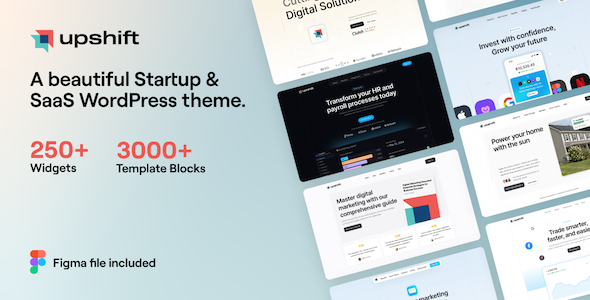
Upshift - Startup & SaaS WordPress Theme
Upshift is a feature-rich WordPress theme by UiCore that blends Elementor-based design with a vast library of demos and blocks to speed up website creation. It emphasizes pixel-perfect layouts, live editing, and robust customization options for diverse sites.
What can you build with Upshift?
- Small Business Websites
- Corporate Websites
- Landing Pages
- Authority Blogs
- Sales & Marketing Pages
- Online Shops
- Best choice for freelancers
Getting started and design workflow
- Easy to Get Started — With an impressive collection of demo templates, block library and One Click Demo Import, getting started with Upshift will only take you a few minutes.
- One-Click Website Installation — With the foolproof demo content import tool, you can have your new website up and running in a matter of minutes. Simply choose which demo website to install, the type of content you want installed (pages, posts, widgets, navigation menu items, media, theme options), and the importer will take care of it, automatically installing any required plugins and reporting errors in case something went wrong.
- UiCore Template Library — Create your amazing website from a collection of 500+ pre-designed sections and pages. Just pick the blocks you like best and combine them. No matter what, it’ll look fantastic.
Design and editing capabilities
- Visual Page Builder — Upshift uses the most powerful drag and drop page builder in the world, Elementor.
- Pixel Perfect Design — The only complete design platform to offer full design control, while producing 100% clean code. Take your design vision and turn it into a cool custom website.
- Live Editing — Viewing each element while styling it makes a world of difference.
- Freehand Design Experience — Position absolute, fixed position, Inline Elements, Vertical & Horizontal Flex Alignment.
- Shape Dividers — Choose from 26 different shape dividers to create eye-catching backgrounds.
- Faster Than Others — Every change you make is instant, resulting in the best user experience.
- Custom Fonts — Choose from any Google font, or upload your own fonts, while previewing it directly from the panel
- Enhanced Background Types — Add any image, slideshow, video, and solid/gradient color as a background
- Revision History — Every time you update a page, a new revision is created, so you can always trace back your steps.
- Auto Save, Redo & Undo — In Elementor, your work is automatically saved. Make a mistake? Quickly undo it with one click.
- Edit in Draft Mode — Work freely on your draft, while keeping a separate published version on the live site.
- Save & Reuse Everything — Work smarter, instead of harder. Save elements you create in Elementor, then reuse them on other pages.
- Export & Import Between sites — Export / import is as easy as it gets. Your entire design gets transferred via a JSON file.
- Hotkeys & Cheatsheet — Hotkeys are keyboard shortcuts that let you do just about any task with one click.
- 200+ Design Elements — Elements enable you to become a power user and take your website to a new level. All of them are available in Elementor page builder.
Theme options, typography and global settings
- At the heart of many popular WordPress themes is a powerful theme options panel. Upshift offers tons of customization options for almost any part of your website. Here are some of the most important features:
- Global Colors — This feature gives you the possibility to customize the colors of all elements on your website in the same time, thus saving time and effort. There are 7 colors to use throughout your website, all of them being linked to all color elements in Theme Options and also fully integrated with Elementor Design System.
- Global Fonts — Just like Global Colors, with Global Fonts you can change the fonts of your website on all pages at once. Choose between Google Fonts or System Fonts, then link to all typography elements in Theme Options. Fully integrated with Elementor Design System.
- Responsive Controls — Device sensitive options allow you to set the individual values for desktop, tablet and mobile.
- Advanced Backgrounds — The background components allows you to select between a solid color, gradient or image.
- Full Typography Options — Complete typography options: font family, font style, text transform, font size, line height, letter spacing and color.
- Live Settings Search — Search for any feature and get instant smart results. Click on a result and it takes you to the selected setting.
- Preset Manager — Save / load settings for each category in theme options. Import ready-made presets (from demos) or use this feature to test various configurations easily.
- Dark Mode — Turn on Dark Mode for a great viewing experience especially in low-light environments.
- Theme Style — Set global options like typography and buttons.
- Server Status — Shows a system check and lets you know if your current server configuration meets the minimum requirements.
- Error Log — Shows a log of errors when one click demo import fails or imports partially.
- Page Options — Overwrite theme options at page Upshift, without using any custom code. Some of the settings available in page options are:
Enable Page Title, Page Title Background, Page Title Background Overlay, Page Title Color, Breadcrumbs, Layout (Boxed or Full Width), Body Background, Enable Header, Transparent Header On / Off, Change Height On Scroll, Top Banner On / Off, Footer On / Off, Copyright On / Off, Custom CSS, Custom JS
- 990+ Google Fonts — Choose the perfect fonts for your website from a huge collection of Google web fonts.
Content design for blog, portfolio and eCommerce
- News & Blogging Platform — Base Layouts: Four stunning blog pages to choose from; Grid Controls: Complete customization options for Grid Columns, Grid Items Spacing, Item Hover Effect, Image Ratio, Image Border Radius and typography; Post Info: On / Off toggle for author, date, category and excerpt; Sidebars: Assign any sidebar for archive page and post page. Sidebars can be set to normal or sticky; Narrow Post Width; Reading Progress; Separate Typography Options; Elementor Widget — Place the blog grid anywhere on your website using the custom UiCore Post Grid element.
- Unique Portfolio — Distinguish your brand with great portfolio features; Grid Controls, Sidebars, Elementor Compatible, Elementor Widget.
- Full eCommerce Support — With a full suite of eCommerce capabilities thanks to great integration with the leading WordPress WooCommerce plugin, creating a highly professional, fully functional online shop has never been easier.
Additional notes on compatibility and quality
- Built With Elementor — 25 Fields, Newsletter Integrations, GDPR Consent, Google reCAPTCHA, File Upload, Export entries as CSV, Redirect after successful submission, Capture User Browser Data.
- Export & Import Between sites — Transfer designs via JSON files.
- Multisite Tested — Upshift tested across multisite setups to ensure consistent behavior.
- Cross Browser Compatibility — Google Chrome, Firefox, Safari, Opera, Microsoft Edge, Internet Explorer 11.
- Clean Code — HTML5, CSS3, and WordPress standards for reliable, maintainable code.
Image and asset credits and updates
All the image and font credits on Upshift demo websites are used only for demonstration purposes and are not included with your purchase. Buy it Once. Get FREE Updates Forever! By purchasing Upshift you are getting access to free lifetime updates and 6 months of premium support.
The information on this website is sourced from the
ThemeForest product page
.