Vienna — Therapy & Holistic Care Elementor Template Kit
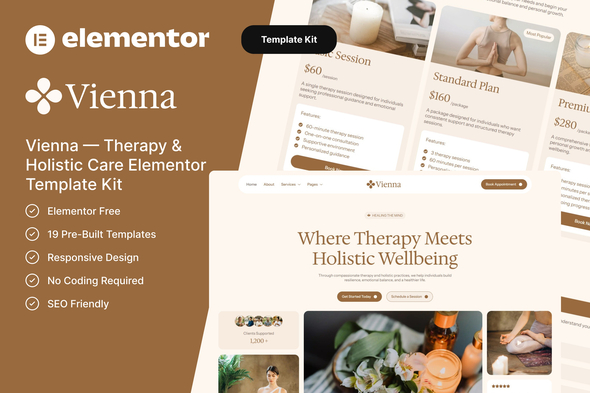
Vienna is a modern Therapy & Holistic Care Elementor Template Kit that blends a calm visual style with professional clarity to help therapists, counseling centers, and holistic wellness professionals establish a welcoming, conversion-focused online presence.
What Vienna is designed to deliver
Vienna combines therapy services, holistic care programs, therapist profiles, testimonials, and a streamlined consultation booking experience into a cohesive, Elementor-built website. It emphasizes a welcoming and trustworthy atmosphere with soft compositions, balanced spacing, and thoughtful section design, tailored for clinics, centers, and wellness practices seeking a calm, professional brand identity.
Built with Elementor, the template kit is fully responsive, easy to customize, and requires no coding skills. It enables a modern, conversion-focused site that works across devices and supports today’s therapy and wellness professionals.
Perfect For
- Therapy Clinics
- Wellness & Holistic Therapy Studios
- Mental Health Professionals
- Counselors & Psychologists
- Wellness Coaches
- Yoga & Mindfulness Centers
Why Choose Vienna?
Vienna is thoughtfully designed for therapists, counselors, and holistic wellness practitioners who want to present their services in a professional and trustworthy way. The layout highlights therapy programs, therapist profiles, and supportive resources to help visitors feel comfortable and confident in choosing your services.
Key Features
- Using Elementor Free (Elementor Pro is not required)
- 19 Pre-Built Templates
- Fully Responsive Layout
- No Coding Required
- SEO Friendly
Included Templates
- Global Theme Style
- Home
- About
- Contact
- Services
- Service Details
- Appointment
- Testimonials
- Pricing
- Career
- Team
- FAQ
- Blog
- Single Post
- 404 Page
- Header
- Footer
- MetForm – Contact
- MetForm – Newsletter
- MetForm – Appointment
Required Plugins
- Elementor
- ElementsKit Lite
- MetForm
How to Import MetForm
- If you have Elementor Pro, skip install of MetForm and form blocks.
- Import the MetForm block templates.
- Import the page template where the form appears and right-click to enable the Navigator.
- Locate and select the MetForm widget and click Edit Form. Choose New, then Edit Form. The builder will appear.
- Click “Add Template” (grey folder icon).
- Click “My Templates” tab.
- Choose your imported MetForm template, then click “Insert” (click No for page settings).
- Once the template is loaded, make any desired customizations and click “Update & Close.” The form will appear in the template.
- Click Update.
Setup Global Header and Footer
- Import the header and footer template.
- Go to ElementsKit > Header Footer, select Header and click Add New.
- Give it a title, leave Entire Site selected and toggle Activation to On.
- Click the template title and Edit Content.
- Click the gray folder icon and select the header template to import and Update.
- Repeat for Footer.
- If you have Elementor Pro, headers and footers are customized under Templates > Theme Builder.
Images
Photos from Unsplash and Pexels are provided for demo purposes and may be replaced with your own.
The information on this website is sourced from the
ThemeForest product page.