Warta - News/Magazine WordPress Theme
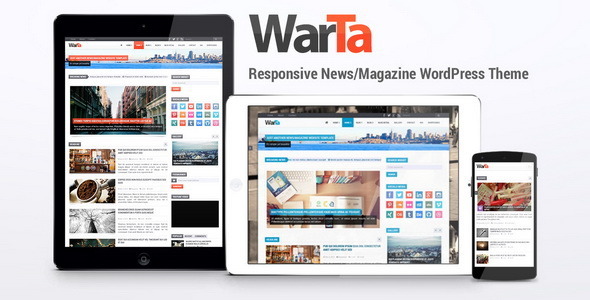
Warta is a responsive WordPress theme designed for news or magazine websites, offering extensive color options, a drag-and-drop page builder, and multilingual readiness to serve diverse audiences.
Core capabilities
- Responsive layout
- 16,581,375 colors
- 4 styles (Boxed, Boxed Flat, Full Width, Full Width Flat)
- Page Builder
- Translation Ready
- WooCommerce Ready
- bbPress Ready
- WPML Ready
- RTL (Right to Left) languages support
- Font Awesome icons
- Google fonts
- Custom CSS, JavaScript and Google Analytics integration
Layouts and page templates
- Home Version 1
- Home Version 2
- Blog Version 1
- Blog Version 2
- Blog Version 3
- Review Bar
- Review Star
- Gallery
- Contact Page
- Contact Page Full Width
- Full Width Page
- Layouts: Shortcodes and WP Editor Custom Buttons
Shortcodes and WP Editor Custom Buttons
- Paragraphs with columns
- Dropcaps
- Small Font
- Button
- Label
- Alert
- Custom Blockquote
- Embed
- FontAwesome Icons
- Togglable Tabs
- Accordion
- Carousel
- Page Break
- Spoiler
Paragraph and content styling options
- Paragraphs with columns
- Dropcaps
- Small Font
- Button
- Label
- Alert
Social media icons and sharing options
- Social Media Icons:
- Amazon
- Behance
- Blogger
- CodePen
- deviantART
- Dribbble
- Facebook
- Feedly
- Flickr
- Forrst
- Foursquare
- Google+
- GitHub
- Grooveshark
- Instagram
- Kickstarter
- Last.fm
- LinkedIn
- Myspace
- Picasa
- Pinterest
- Quora
- reddit
- Renren
- RSS
- SoundCloud
- Stack Exchange
- Stack Overflow
- Steam
- Technorati
- Tencent Weibo
- Tumblr
- Twitter
- Vimeo
- Vine
- Wikipedia
- VK
- Weibo
- WordPress
- XING
- Yahoo
- YouTube
- Zerply
- Share buttons:
- Facebook
- Pinterest
- Twitter
- Google+
- LinkedIn
- Digg
- Tumblr
- Mail
Language, translation and accessibility
- Translation Ready
- WPML Ready
- RTL (Right to Left) languages support
- Google fonts
Sources and credits
- Frameworks
- Bootstrap – http://getbootstrap.com/
- Underscores – http://underscores.me/
- Redux Framework – http://reduxframework.com/
- Icons
- 40 Social Media Flat Icons – http://graphicburger.com/40-social-media-flat-icons/
- Dashicons – http://melchoyce.github.io/dashicons/
- Font Awesome – http://fontawesome.io/
- Images
- Pixabay – http://pixabay.com/
- Unsplash – http://unsplash.com/
- JavaScript
- Direction-Aware Hover Effect with CSS3 and jQuery – http://tympanus.net/codrops/2012/04/09/direction-aware-hover-effect-with-css3-and-jquery/
- gmaps.js – http://hpneo.github.io/gmaps/
- imagesLoaded – http://desandro.github.io/imagesloaded/
- jQuery – http://jquery.com/
- jQuery UI – http://jqueryui.com/
- jQuery Marquee Plugin with CSS3 Support – http://aamirafridi.com/jquery/jquery-marquee-plugin
- jquery-placeholder – https://github.com/mathiasbynens/jquery-placeholder
- Modernizr – http://modernizr.com/
- Nivo Lightbox – http://dev7studios.com/plugins/nivo-lightbox
- RateIt – http://rateit.codeplex.com/
- Tweetie – https://github.com/sonnyt/Tweetie/
Change Log highlights
- V2.0.0 – January 31, 2019
- WARNING: Breaking changes. Please follow the upgrade guide.
- Removed: secondary, headings link and body link color options.
- Removed: Less PHP Compiler plugin requirement.
- Updated: replace contact page map coordinates with embed code.
- Added: option to use custom contact form.
- Removed: bounce carousel animation option.
- Updated: move theme options menu to under "Appearance" menu.
- Removed: contact email functionality and use third party plugin instead.
- Updated: Move content*.php template parts to parts/content directory. Remove: TwitterOAuth library and use oauth-twitter-feed-for-developers plugin instead. Updated: Requires at least WordPress 4.7.0. Removed: StumbleUpon share button and social icon. Added: reddit, VK, XING, Skype, Blogger and Evernote share button.
- V1.8.8 – October 17, 2017
- Added: Custom view more link option for Articles widget.
- V1.8.7 – October 15, 2017
- Fixed: The excerpt on Articles widget should not be displayed if the excerpt length option is set to 0.
- V1.8.6 – August 14, 2017
- Fixed: Text widget no longer working on Page Builder since WordPress 4.8.0.
- Updated: WooCommerce template files.
- V1.8.5 – July 28, 2017
- Added: option to show/hide the footer.
- Improved: set the body background-size to cover if the image width >= 1367px.
- V1.8.4 – July 11, 2017
- Fixed: related posts should not be displayed if the current post does not have any categories or tags.
- V1.8.3 – August 20, 2016
- Fixed: share buttons not displayed.
- V1.8.2 – April 20, 2016
- Fixed: pagination item is collapsed when there is a white space.
- Fixed: Slider Tabs stopped working on WordPress 4.5.
- V1.8.1 – December 28, 2015
- Fixed: Allow users to change the threaded comments settings. By default, WordPress ignores the threaded comments settings if we use max_depth argument on wp_list_comments().
- V1.8.0 – December 25, 2015
- Improved: responsiveness of the images.
- Improved: posts pagination.
- Fixed: loading icon cannot be displayed on the page builder since WordPress 4.4.
- V1.7.9 – October 15, 2015
- Added: Ability to show random posts on Articles widget.
- V1.7.8 – August 09, 2015
- Fixed: Custom sidebar only works on pages, but not posts.
- V1.7.7 – April 24, 2015
- Fixed: Security vulnerabilities.
- V1.7.6 – April 18, 2015
- Fixed: page builder content can only be displayed for logged in users.
- V1.7.5 – April 10, 2015
- Improved: Page Builder user interface.
- Fixed: wide table overflowing on small devices.
- Added: WordPress SEO breadcrumbs.
- V1.7.4 – December 9, 2014
- Improved: Sub Categories Widget. Allow users to select any sub-category as long as that sub-category have sub-categories that are not empty.
- V1.7.3 – November 21, 2014
- Added: option to force all gallery posts to display with selected column count.
- V1.7.2 – November 20, 2014
- Added: pagination option to Articles widget.
- V1.7.1 – November 05, 2014
- Improved: page builder flexibility.
- Fixed: cannot use TinyMCE plugin "column" for multiple paragraphs.
The information on this website is sourced from the
ThemeForest product page
.