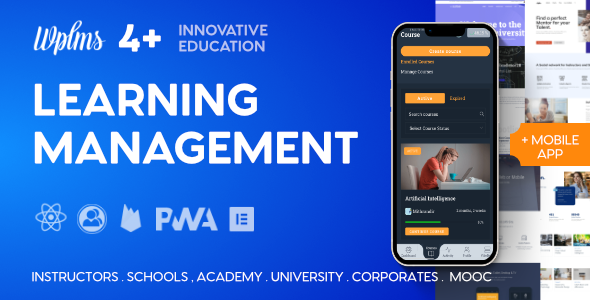
WPLMS Learning Management System for WordPress, WordPress LMS
WPLMS Theme 4.971 update is live as of 17th October’25, delivering AI-powered course capabilities, enhanced LMS tools, and broader integration options for WordPress-based learning sites.
ROADMAP 202X
- Artificial Intelligence Integration in Course Units
- Adaptive learning via AI in Course curriculum
- AI Quizzes [ Live ]
- AI Questions Generator [ Live ]
- Quiz Contests [ Live ]
- Export Courses built in WPLMS to SCORM 1.2 playable in any LMS
- Export Courses built in WPLMS to xAPI
- Game Courses
- AI Bot integration
What others say about us
WPLMS Instructor Trial :playground.wplms.io, login : instructor pwd : p@ssword
Theme Features
- PWA — Progressive Web App. Allow users to install the Progressive web app.
- Offline — Works offline even without internet based on cached data, images, videos* and more. Instant load speeds of 200ms !
- Mobile, DeskTop/ Tablet App — One Click generation of App from within the Theme options panel. One App for Administrator, Instructors, Students and any custom role of your site.
- Courses — Create courses in WPLMS. Include sections, units, quizzes, assignments with grading options.
- Live Chat — Inbuilt Live Chat with other members online in the site.
- Real Time Notifications — Notify users in realtime of the activities happening on site. Like : Student added to course, Instructor sends announcements etc.
- Push Notifications — Push notifications even when offline (Safari iOS not supported as of now).
- Course Layouts — Create Layouts in Elementor/Divi* for courses. Different layouts for courses of different categories or individual course layout also possible.
- Activity — Activity Tracking of student. Categorised per course, quiz, assignment and other modules.
- Reporting — Create customised reports, schedule reports, email reports. Standard reports per course, quiz exist.
- Certificates — Design & Award your certificates. With Student, Instructor information with unique code validation.
- Quizzes — Create Quizzes in WPLMS. 2 Types of quizzes – Static question set, Dynamically generate question set from a pool of questions. Supports, Manual evaluation, automatic evaluation and re-evaluation of quizzes.
- Assignments — Create Assignments in WPLMS. Assignments are like homework, a problem statement and a manual evaluation. Users can upload assignments. Instructor Remarks & corrected uploads with marks.
- Badges — Award badges on Course completion. Assign a badge image and a title.
- Units — Create Units in WPLMS. Unit can comprise of Video, Audio, Documents, PDF, Text and
- Sections — Create Sections in WPLMS. A section can comprise of units, quizzes, assignments.
- Font End Course Creation — The powerful drag drop Course creation module for Instructors. Easy to use and all settings in 1 place.
- Personal/Instructor Notes — Notes module for units. Students can save personal notes. Instructor can leave notes for students besides the content.
- Discussions — Public discussions on Units in a course.
- Ask Instructor — Students can ask questions and notify instructor to respond on the messages.
- Bulk add Students — Bulk add students into courses. Users can select multiple students.
- Questions — Create Questions in WPLMS. 8 Type of questions. Match Answers, Sort Answers, Select Drop down, Fill in the Blank, Multiple choice single correct, Multiple choice multiple correct, Text and Essay type.
- Questions Bank — Pull out questions in a Quiz from a Pool of questions
- Bulk Import Questions — Import questions in bulk. Easily import questions from a CSV and import questions in bulk.
- Code Questions — Self evaluation of Code questions.
- Sell Courses — Sell Courses via WooCommerce or EDD. All payment gateways supported by WooCommerce are supported. Manual payment methods, COD, Bank Account also accepted.
- MemberShips — Sell Courses via Memberships. Membership plugins required : Pmpro, Restrict content pro, WooCommerce Memberships. ARMember, WishlistMember and more.
- Practice Quiz — Allow students to do sample quizzes.
- Course bundles — Sell bundles of Courses. Group courses into bundles and sell for single price via WooCommerce, EDD.
- Course Subscriptions — Set a monthly, yearly, weekly price for Courses.
- Categories — Categorise the courses. Show categories and Filter courses by categories.
- Expire Courses — Set a maximum duration within which the courses should be completed
- Certificates — Assign certificates to Courses/ Users
- Manual Assign Courses — Assign Courses manually to Students. Notifications/Emails are sent.
- Manual Course Subscription — Manage Course subscription time manually, course administration area. Notifications/Emails are sent.
- Course Announcements — Send Announcement for the course. Displays highlighted in Students Profile. 1 announcement per course. Notifications/Emails included.
- Course News — Course’s own blog. Instructor can create news and students will get notified by email/push/internal notifications.
- Messages — Private messaging for Student interaction with Instructors or other students.
- Notifications — Internal notification system. Users see a notifications panel.
- Friends — Users can add friends and friends can see each other’s activities in activity module.
- Followers — Users can follow each other and get notifications when the followed user takes actions or comes online.
- Groups — Create groups, student groups, Instructor groups and more.
- Bulk Course Messages — Send Bulk messages to Course students. All students, selected students or based on course status and expiration.
- Course Activity — Track all activity that happens in the course. Student’s activity inside the course.
- Manual Evaluations — Manually evaluate courses, quizzes, assignments or re-evaluate existing one and instructor can leave remarks.
- Emails — Customise email appearance and content right from the WP admin panel.
- Custom Registration Forms — Create unlimited registration forms with various options. Registration forms for member types, user roles, filled information directly inside the profile.
- Notes — Create and Maintain notes site wide. Student can create note in the course pursue screen.
- Email Schedule — Send reminder emails to user before course expiry, when new content is unlocked in drip courses or when they’ve not logged in to the site for some time.
Extendible Features
- Members Directory — Customisable Sortable members directory. Create unlimited member directories for users in your site. Categorise users based on Member types. Show filter options based on Member type, member profile fields.
- Member Types — Categorise members of your site into Member Types.
- Member Cards — Create Cards for various members. Create Cards for Member types, Card for specific member.
- Vibe Drive — A Drive option where users can upload files and share among users. Option to sync with DropBox, Google Drive * and S3[works with version4 only]
- Vibe Calendar — A Calendar first Personal calendar for members of your site. Sync. with Google Calendar* . Create events, invite members. Set location and drag drop on calendar. [works with version4 only]
- Vibe KB — Knowledge base component. Create articles and share with members who can edit. Public knowledge base. [works with version4 only]
- Groups Directory — Customisable Sortable Groups directory. Create unlimited group directories for users. Categorise users based on Member types. Show filter options based on Member type, member profile fields.
- Group Cards — Create Cards for various groups. Create Cards for Group types, Card for specific group.
- Group Types — Categorise groups of your site into Group Types.
- Vibe Helpdesk — BBPress on ReactJS. Fast and works in app. [works with version4 only]
- Addons — BigBlueButton Video Conferencing; Vibe BBBZoom Conferencing (Conferencing Solutions Via Zoom); Vibe Zoom; Jitsi Conferencing (Conferencing Solutions Via Jitsi); Vibe Jitsi
- Front end blog posts — Enable users to post blogs using front end; vibe posts
- Deep Analytics — Google analytics tracking of various activities in WPLMS; WPLMS GA
GDPR compliance
WPLMS is 100% GDPR complaint product.
Updates & Fixes
Past Update Log (selected recent versions):
- VERSION 4.971 [17th October'25]
- VERSION 4.970 [11th August'25]
- VERSION 4.966 [3rd June'25]
- VERSION 4.965 [9th April'25]
- VERSION 4.964 [14th January'25]
- VERSION 4.963 [8th November'24]
- VERSION 4.962 [6th November'24]
- VERSION 4.961 [17th October'24]
- VERSION 4.96 [18th July'24]
- VERSION 4.95 [12th June'24]
- VERSION 4.94 [9th February'24]
Note: The full historical log contains many earlier releases; this excerpt highlights the most recent updates.
Credits
Images fromunspash.com,picjumbo.comandpixabay.com
The information on this website is sourced from the
ThemeForest product page
.