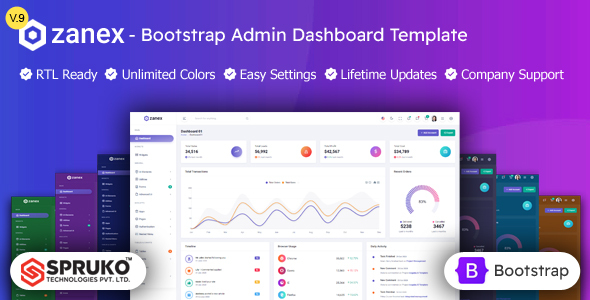
Zanex - HTML Admin Dashboard Bootstrap Template

SPRUKO By SPRUKO
Created: 4 years ago
(5.00 Rating)
611 Sales

Zanex - HTML Admin Dashboard Bootstrap Template

Key Features and Capabilities

  • 100+ HTML Pages ready-to-use layouts and screens for rapid development.
  • 20+ Plugins integrated to extend functionality without starting from scratch.
  • Single Dashboard streamlined interface designed for a cohesive admin experience.
  • Vertical & Horizontal menu options to suit different UI patterns.
  • Menu Click, Menu Hover, Icon Click and Icon Hover responsive navigation interactions.
  • 3 Types of Charts for data visualization within dashboards.
  • Responsive Bootstrap 5 Framework optimized for all devices and viewports.
  • Well Commented Code to facilitate customization and development.
  • Grid JS Tables for dynamic, client-side data presentation.
  • Filepond and Dropzone for enhanced file uploads.
  • Easy to Customize with a clean design and flexible components.
  • Neat, Clean and Simple Design for a modern UI look.
  • TimeLine, Message Chat widgets for interaction and activity streams.
  • Google Fonts support for typography choices.
  • 3 Types of Maps for geospatial data visualization.
  • Mail Inbox and other communication-oriented pages.
  • 6 Types of Icon Sets for flexible iconography.
  • Lock Screen Pages and other admin utilities.
  • Error Pages, Shopping Cart, Checkout, Order Details, and Wish List for e-commerce demos.
  • Professional Company Support and Regular Updates for ongoing assistance and improvements.
  • Form Elements, Image Gallery, and Under Construction Page for varied UI needs.
  • Invoice Page, Calendar, and Pricing Tables for business workflows.
  • Very Easy to Create Your Own Site with extensive widgets and components.
  • W3C Validated code and Clean, Well-Structured Code.
  • RTL Supported for right-to-left language compatibility.
  • Professional Documentation and Extensive Documentation for setup and customization.

Customization and Theme Options

  • Customization Options (Switcher Features) to tailor the UI to project needs.
  • Theme Modes: Light, Dark, Transparent, Gradient, and Color options.
  • Layout Styles: Boxed, Full Width, Compact, Vertical, and Horizontal layouts.
  • Page Styles: Regular and Classic page variations.
  • Header Options: Light, Dark, Transparent, Gradient, and Color headers.
  • Header Behavior: Fixed and Scrollable.
  • Menu Variants: Vertical or Horizontal, with Light, Dark, Transparent, Gradient, Color, and Image backgrounds.
  • Menu Behavior: Fixed and Scrollable navigation support.
  • RTL Support: Fully integrated for right-to-left languages.

Technical Details and Dependencies

  • Bootstrap v5.3.2 as the core framework.
  • Sass for styling workflow.
  • Gulp v4.0.2 as the build system.
  • No jQuery Dependent architecture for a modern JS approach.
  • RTL Supported for multilingual projects.
  • W3C Validated code ensuring standards compliance.
  • Regular Updates and Extensive Documentation for ongoing improvements.

What You Get

  • CSS, SCSS, and JavaScript Files for styling, theming, and interactivity.
  • Professional Documentation to guide setup, customization, and deployment.
  • Lifetime Free Updates to receive ongoing improvements.

Important Information

  • This HTML Bootstrap admin dashboard template is delivered in a static format, offering freedom to develop custom functionality and personalize the dash UI to fit specific needs.
  • It provides great flexibility for tailoring the admin dashboard UI, but effective use may require technical expertise in web development and frontend customization.
  • Consult with your development team prior to purchase to ensure alignment with project objectives and technical requirements.

Why Choose SPRUKO® TECHNOLOGIES PRIVATE LIMITED

  • Legally Registered Company
  • Elite Envato Author with 5-star ratings
  • Years of industry experience delivering top-notch solutions
  • Global Reach
  • Comprehensive Documentation
  • Lifetime Updates & Friendly Support
  • Customer-Centric Approach

Post-Purchase Support and Contact

  • Support Overview: Expert team available on business working days to provide fast, reliable assistance; non-technical help support is available on remaining days.
  • Official Channels: Support is not provided via the comments section; use official helpdesk channels.
  • Support Period: Support extends for the active product support period; renewal or extension is required to continue support post-expiration.
  • How to Contact Support: Refer to the product's support policy and contact options within the official documentation.

Additional Notes and Recommendations

  • All demo images are for demonstration purposes only; they are not included in the final purchase files.
  • Plan with your development team to ensure alignment with project objectives and technical requirements before purchase.

The information on this website is sourced from the ThemeForest product page .

Customer Reviews

5.0
8 reviews

Loading reviews...

Item Support

This author will respond to buyers' questions and provide support through their own support system.

Item support includes:

  • Availability of the author to answer questions
  • Answering technical questions about item\u2019s features
  • Assistance with reported bugs and issues
  • Help with included 3rd party assets

However, item support does not include:

  • Customization services
  • Installation services

Contact the author

This author will respond to buyers' questions and provides limited support through their own support system.

Item support includes:

  • Availability of the author to answer questions
  • Answering technical questions about item’s features
  • Assistance with reported bugs and issues
  • Help with included 3rd party assets

However, item support does not include:

  • Customization services
  • Installation services

View the item support policy
Go to item support