Essu - Simple Portfolio WordPress Theme for Freelancer, Web Designer & Agency
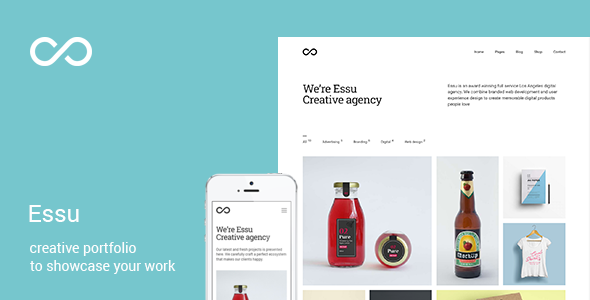
Essu is a simple and minimal creative portfolio theme for WordPress with RTL support, designed for professionals and creatives who want a modern, flexible portfolio site that’s easy to set up and customize.
Core features
- Live Customizer to tweak the theme
- One click demo import
- WPBakery Page Builder included for free
- RTL support
- Envira gallery support
- Gif images support for portfolio thumbnails
- 800+ Google Fonts
- Mobile friendly and retina-ready design
- Three menu styles:
- Classic menu
- Minimal menu
- Side menu
- 100% Mobile friendly
- Lazy loading adaptive images
- Portfolio layout with filter function
- Rich portfolio layouts
Layout options and portfolio formats
- Grid layout:
- 2 columns
- 3 columns
- 4 columns
- Masonry layout:
- 2 columns
- 3 columns
- 4 columns
- Mosaic layout:
- 2 columns
- 3 columns
- 4 columns
- Gap control to adjust spaces between projects on the portfolio page
Portfolio management and SEO readiness
- 1250+ Retina Icons
- SEO optimised
- Bulk image upload with frontend photo gallery management
- WordPress SEO by Yoast Supported
- WooCommerce 2.3.x and up ready
- Easy sorting of gallery photos
- Quick accents colour change
- Multisite support
- Multi-language, Translation Ready, WPML Support
- Unlimited portfolio and photography gallery pages
- Image Gallery
- Child theme included
- WPML compatible
- Contact Form 7 compatible
- Extensive Documentation
- Accurate and valid cross-browser code
- Free Updates
- ...and more…
Best suited for
Best suited for: personal portfolio, agency, products showcase, architect agency, design studios, painter, modeling agency, art, photography studios, web design works, illustrators, wedding photographer, freelancer portfolio, graphic designer, minimal portfolio.
Updates
- Version 3.3.1 - Plugins update
- Version 3.3 - RTL support; Performance improvements
- Version 3.2 - Plugins update; New Dark style
- Version 3.1 - Plugins update; GIF images support for featured images
- Version 3.0.1 - Plugins update
- Version 3.0 - Added ability to display a project title below an image on the portfolio page
- Version 2.9 - Stability and performance improvements; Fixed issues with shortcodes on the blog page
- Version 2.8.4 - Plugins update
- Version 2.8.3 - Fixed 'Share' button hover issue; Google+ removed from 'Share' button; Plugins update
- Version 2.8.2 - Plugins update
- Version 2.8.1 - CSS improvements
- Version 2.8 - Plugins update
- Version 2.7.1 - VisualComposer updated to the latest version
- Version 2.7 - Fixed issue when user wasn't able to see option to select what to display on the portfolio page; Plugins update
- Version 2.6 - Added ability to change navigation order through projects (new option found in Customizer -> Appearance)
- Version 2.5 - Fixed images of the metabox cleared when changing image the post content in Gutenberg
- Version 2.4 - Fixed issues when user wasn't able to see more than 10 Envira galleries while editing the project; Plugins update
- Version 2.3 - Added adaptive images support; Fixed issue when portfolio settings wasn't visible
- Version 2.2 - WordPress 5.0+ support; Plugins updates to their latest versions; Added ability to select number of columns while using plain images in projects (new option)
- Version 2.1 - Added ability to change URLs structure for portfolio items (new option in Settings -> Permalinks)
- Version 2.0 - All theme settings moved into the WordPress Customizer; Added ability to select Google fonts
- Version 1.9 - Minor CSS fixes; Plugins updated to latest versions
- Version 1.8 - Plugins updated to latest versions
- Version 1.7 - Visual Composer updated to latest version; CSS improvements
- Version 1.6 - New portfolio styles (Masonry & Mosaic); Added ability to assign projects to particular portfolio pages; 'Featured project' option deprecated; Minor CSS fixes
- Version 1.5 - Added infinite scroll (load more button); UI improvements: disabled notice where Envira Gallery Lite must be installed when using Envira Gallery Pro version; Envira Gallery compatibility improvements; Fixed bug while using Envira Gallery in standalone mode
- Version 1.4 - fixed Edge bug
- Version 1.3 - added ability to set the custom overlay color for projects; Visual Composer plugin updated to the latest version
- Version 1.2 - added smart page preloader (new option); fixed issue with retina logo; fixed Safari bug
- Version 1.1 - added ability to make project description sticky
- Version 1.0 - Initial release
The information on this website is sourced from the
ThemeForest product page
.